


FIXD OBD2 Scanner
4.113.25K Reviews
App Specs
- Version
- 26.16
- Updated On
- License
- Free
- Downloads
- 1,000,000+
- Developer
- FIXD
- Categories
- Auto & Vehicles
- Platform
- Android, iOS
Screenshots
 Analysis by AppCompare
When a warning light appears, the hard part is often not spotting it but deciding what to do next. FIXD OBD2 Scanner is a car-diagnostic app from FIXD that pairs with a compatible scanner to help translate vehicle information into language an everyday driver can use. I see its strongest role as a first step: it can help me arrive at a repair conversation with better questions, but it cannot replace a mechanic’s inspection or guarantee a diagnosis.
Where the app fits today
FIXD is a free Auto & Vehicles app, rated for Everyone, with optional in-app purchases ranging from $0.99 to $119.99 per item. It has a 4.3 average from around 29,000 ratings, and more than one million installs. Those figures suggest it has found a broad audience, though popularity alone does not tell me whether it suits a particular car or repair problem. The useful question is whether you want a simpler interpretation of scan information and are willing to use the scanner hardware the app is designed to work with.
That distinction matters if you are comparing it with a code-reading app that works with a separate, generic adapter. An OBD2 app is only one part of the setup: the vehicle, scanner, phone connection, and the information the car makes available all shape what you can see. Before buying or borrowing hardware, check that it is compatible with your vehicle and phone. If you already have a scanner that you rely on, confirm that it works with FIXD rather than assuming every Bluetooth adapter will do.
Version context and what it means for regular users
The app was released on September 17, 2015, and its current version is 25.36. That gives a reader useful context: FIXD is an established product rather than a newly launched diagnostic experiment, while the version number identifies the current build more precisely than the original release date does. I would not treat either fact as proof of a particular new feature or a promise about future development; version numbers by themselves do not explain what changed.
For someone already using it, the practical habit is to check the app’s current behavior after an update instead of assuming a familiar screen or workflow has stayed exactly the same. If you depend on a saved maintenance routine, for example, make sure the reminders and vehicle details still look right when you next open the app. For a new user, the version is a reason to install the current release rather than rely on an old setup guide that may show a different interface.
Using the scanner without overtrusting it
Setting up the FIXD OBD2 Scanner was surprisingly easy. All you need is the scanner itself, which plugs into your car’s OBD2 port (usually found under the dashboard), and the companion app available on Android and iOS. Once plugged in, the app connects via Bluetooth, and you’re good to go. It’s like one of those cooking shows where they promise you’ll have dinner ready in 30 minutes – only this time, it actually works!
User-Friendly Interface
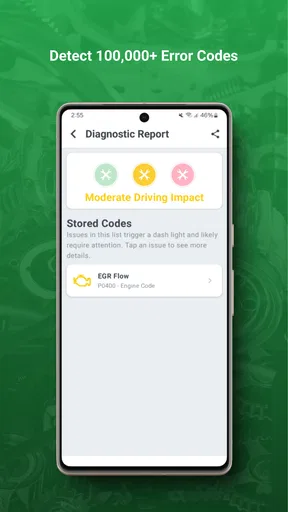
First impressions matter, and the app’s interface is as clean and intuitive as they come. Whether you’re a car aficionado or someone who only knows how to fill up the gas tank, FIXD breaks down complex data into simple, understandable terms. It even gives you a heads-up on the severity of the problem, so you know if it’s something you need to address right away or if it can wait a little longer.
Worth Reading Before You Choose

Flipboard Shows What News Apps Must Do Beyond the Feed

Switching to Android Auto Means Rethinking Your Driving Routine

Google Calendar Makes a Crowded Week Easier to Manage

Ludo King Makes the Most of the Minutes Between Plans

Baby Panda World Brings Quick Play to Modern Phones, but Its Game Library Feels Busy

ESPN’s Live Game View Makes Following Close Games Easier
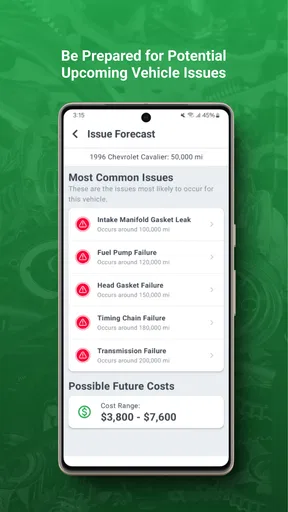
That plain-language approach is most helpful when it gives you a starting point, not a final verdict. A code can identify a system or condition that needs attention without naming the exact failed part. Two different causes can lead to similar symptoms, so I would use the explanation to prepare questions and decide whether to arrange a proper inspection, rather than order a replacement part based on one scan.
Features that Stand Out
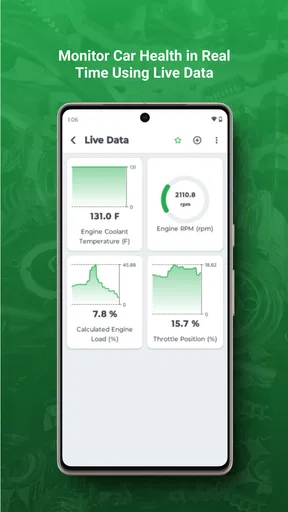
One of the coolest features is the real-time monitoring. You can track your vehicle’s health and performance as you drive, getting insights into things like engine load, fuel trim, and coolant temperature. It’s like having a little dashboard spy constantly feeding you information.
Those readings are more valuable when you compare them with a specific concern than when you watch them just to collect numbers. If the car is running roughly, noting when the symptom happens and what the app shows can give a repair shop useful context. I would not recommend trying to interpret changing readings while driving; check them while safely parked, and keep your attention on the road.
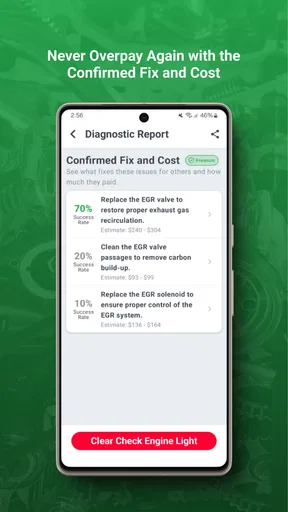
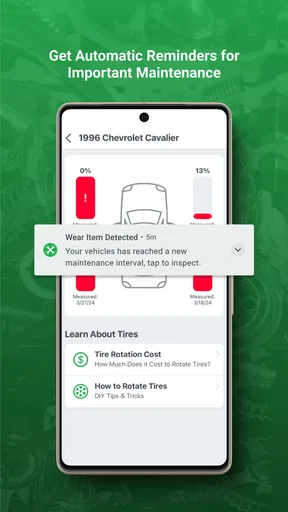
Plus, the app sends alerts and reminders for maintenance, so you’re always on top of your car’s needs. No more excuses for forgetting that oil change! And if you’re someone who dreads those cryptic error codes, FIXD provides detailed explanations and potential solutions, saving you a trip to the mechanic for minor issues.
I’d treat reminders as a planning aid rather than a substitute for the vehicle’s manual or service records. A reminder can help you remember to check an item, but the right maintenance interval depends on the car and how it is used. Keeping receipts or a simple service log alongside the app also helps avoid doing the same work twice, especially if more than one person looks after the vehicle.
Compatibility, limits, and alternatives
One of the things I appreciate most is the scanner’s versatility. It works with any gas-powered vehicle from 1996 onward. So, whether you’re rolling in a classic or a modern marvel, FIXD has you covered. It’s like that universal remote that actually controls all your gadgets – a rare find indeed.
Even with that broad compatibility, I would check the specific vehicle and scanner before making a decision. A car’s age and fuel type are useful starting points, not a reason to assume every vehicle exposes the same information. If the app cannot answer the question you care about, a professional scan or a workshop’s diagnostic equipment may be a better next step. Drivers of vehicles outside the stated gas-powered coverage should look for a tool designed for their vehicle rather than counting on this setup.
Compared with a basic code reader, FIXD’s appeal is the combination of scanner connection, explanations, and reminders in a phone app. A basic reader may be enough if all you want is to retrieve a code and you already know how to interpret it. A repair shop is the better alternative when a fault is persistent, the symptoms are serious, or the diagnosis requires hands-on testing. FIXD sits between those choices: more approachable than raw codes for many owners, but not a replacement for expert work.
A practical routine for warning lights
Imagine the check-engine light comes on during an ordinary week. Once parked safely, I would connect the scanner, read the information, and note both the code explanation and what the car was doing when the light appeared. I would avoid clearing a warning just to make it disappear: doing so can erase context that could help with diagnosis and may leave the underlying issue untouched. If the car feels unsafe, runs badly, or shows a serious warning, I would stop using it and seek qualified help rather than rely on an app’s severity label.
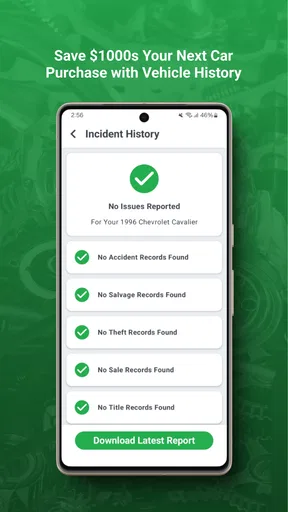
If the car still seems safe to drive, the scan can help me make a more informed call about arranging service. I’d describe the symptoms to the mechanic and share the scan result as a clue, not insist that it identifies a specific failed component. That approach can make the conversation clearer while leaving room for proper testing. It is also a sensible way to use the app if you are buying a used car: a scan may reveal something worth asking about, but it cannot establish the vehicle’s overall condition or replace an independent inspection.
Who is likely to get the most from it?
I think FIXD is best suited to drivers who want a less intimidating introduction to diagnostic information, keep track of routine maintenance, or prefer to gather clues before calling a repair shop. It can also be useful in a household where one person handles the car but another needs a clear explanation of why a warning light deserves attention. The app is less compelling if you already own professional diagnostic equipment, want deep manufacturer-specific analysis, or expect a phone app to pinpoint every mechanical fault.
There is also a hardware trade-off to keep in mind. The app itself is free, but using a scanner-based workflow requires the compatible physical scanner; the free download alone does not turn a phone into an OBD2 reader. Optional purchases may add cost, so I would review what an item offers and whether it addresses a need before paying. If you only need a one-time code check, borrowing a compatible tool or asking a repair shop may make more sense than building a setup you will rarely use.
What I would watch before relying on it
My main reservation is the risk of reading a useful explanation as a definitive repair plan. Diagnostic descriptions can narrow the conversation, but vehicle faults need context: when they occur, whether there are other symptoms, and what inspection reveals. The second friction point is the dependence on compatible hardware and a working phone connection. If either part of that chain is unavailable when a warning appears, the app cannot do much in that moment.
I’d also keep expectations realistic about maintenance reminders and live readings. They can help organize ownership and make vehicle behavior easier to discuss, but they do not replace the owner’s manual, scheduled service, or safe driving judgment. The app’s value is strongest when I use it to notice, record, and communicate—not when I ask it to make a risky decision on my behalf.
Final Thoughts
In conclusion, if you’re someone like me who tends to ignore car problems until they can’t be ignored anymore, the FIXD OBD2 Scanner is a game-changer. It’s affordable, easy to use, and incredibly helpful. It empowers you to understand what’s going on under the hood and to take charge of your car’s health without feeling overwhelmed. So, next time your car starts acting up, you can face the situation with confidence instead of dread. FIXD might just be the peace of mind you didn’t know you needed.
I’d recommend it as a confidence-building companion for everyday drivers, with one important condition: treat its results as clues and follow up when the symptoms call for it. If that balance sounds right, the straightforward explanations may make car ownership feel less mysterious. If you need a definitive diagnosis, specialist functions, or support for a vehicle outside its stated compatibility, choose a suitable professional tool or mechanic instead.
Pros
- Easy setup with Bluetooth connectivity.
- Comprehensive vehicle diagnostics.
- User-friendly interface.
- Real-time alerts for issues.
- Compatible with most cars.
Cons
- Limited features without subscription.
- Bluetooth connection can be unstable.
- App interface needs visual upgrade.
- Not suitable for advanced diagnostics.
- Requires location access for use.
FAQs for FIXD OBD2 Scanner
What is the FIXD OBD2 Scanner and how does it work?
The FIXD OBD2 Scanner is a Bluetooth-enabled device that connects to your car's OBD2 port to diagnose and monitor vehicle health. Once plugged in, it communicates with the FIXD app on your smartphone, providing real-time alerts, maintenance reminders, and detailed insights about your vehicle's performance and potential issues.
Is the FIXD OBD2 Scanner compatible with all vehicles?
The FIXD OBD2 Scanner is compatible with gasoline-powered vehicles made in 1996 or later and diesel vehicles made in 2008 or later. It supports most makes and models, but it’s always a good idea to check the compatibility with your specific vehicle model on the FIXD website before purchasing.
Do I need a subscription to use the FIXD OBD2 Scanner app?
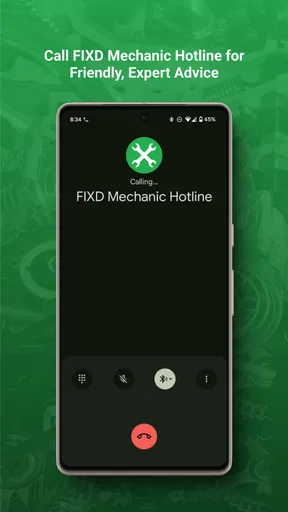
While the FIXD app is free to download and use with basic features, there is an optional premium subscription available. The premium version offers enhanced features like live data monitoring, advanced diagnostics, and access to a certified mechanic hotline for more in-depth support.
How accurate are the diagnostics provided by the FIXD OBD2 Scanner?
The FIXD OBD2 Scanner provides highly accurate diagnostic reports by reading error codes directly from your vehicle's onboard computer. It translates these codes into simple terms in the app, allowing users to understand potential issues. However, for complex problems, consulting a professional mechanic is recommended.
Can the FIXD OBD2 Scanner be used on multiple vehicles?
Yes, the FIXD OBD2 Scanner can be used on multiple vehicles, but each vehicle will require its own sensor. You can purchase additional sensors and manage multiple vehicles simultaneously within the same app, making it a convenient tool for families with several cars or small business fleets.


